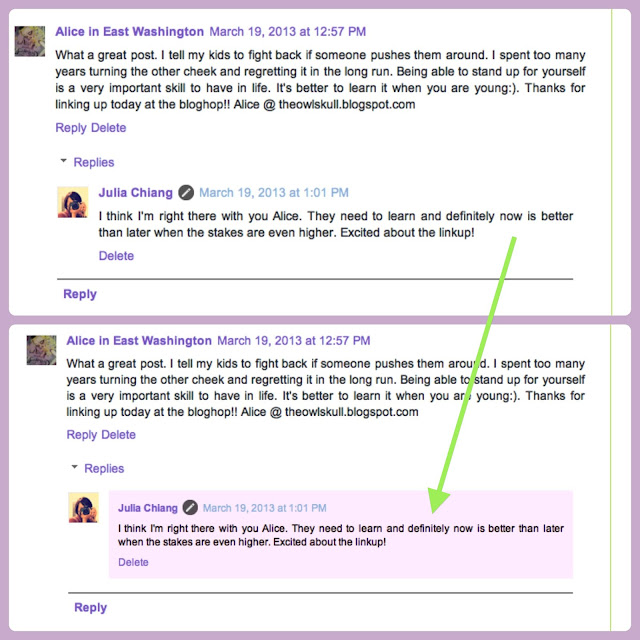
So this is what I did:
1. Go to your Template section and click on Edit HTML

2. Click Expand Widget Templates
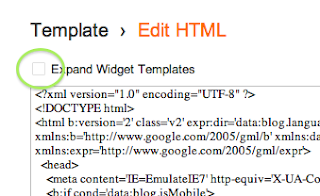
3. Find (use command F on mac)
</body>
4. Copy and paste the following code right above it
<script src='http://code.jquery.com/jquery-latest.js'/>
<script>
$(function() {
function highlight(){
$('.user.blog-author').closest('.comment-block')
.css('border', '1px solid #FFF0FF')
.css('background','#FFF0FF url("http://www.blogblog.com/1kt/transparent/white80.png")')
.css('color', '#444444')
.css('font-size', '12px')
.css('padding', '10px');
}
$(document).bind('ready scroll click', highlight);
});
</script>
<script>
$(function() {
function highlight(){
$('.user.blog-author').closest('.comment-block')
.css('border', '1px solid #FFF0FF')
.css('background','#FFF0FF url("http://www.blogblog.com/1kt/transparent/white80.png")')
.css('color', '#444444')
.css('font-size', '12px')
.css('padding', '10px');
}
$(document).bind('ready scroll click', highlight);
});
</script>
Line 6: Change border color by altering #FFF0FF
Line 7: Change background color by altering #FFF0FF
Click here for color choices.
Voila!!! You've got yourself a new look! Yippeee....
I'm so thrilled with my new background color.....can't wait to do more.
Send me your links so I can check out your changes.....have fun!
Happy Coding!